Transform Your Stream Deck Experience with Premium Custom Icons and Profiles
Elevate Your Workflow with Professional Stream Deck Customization
Unlock the full potential of your Elgato Stream Deck with our carefully crafted collection of custom icons and pre-configured profiles. Designed for content creators, streamers, professionals, and productivity enthusiasts who demand both style and functionality. Many of our profile packs include configurations for the Stream Deck XL, Stream Deck (15-key), and Stream Deck Plus, so you can get started no matter which model you own.

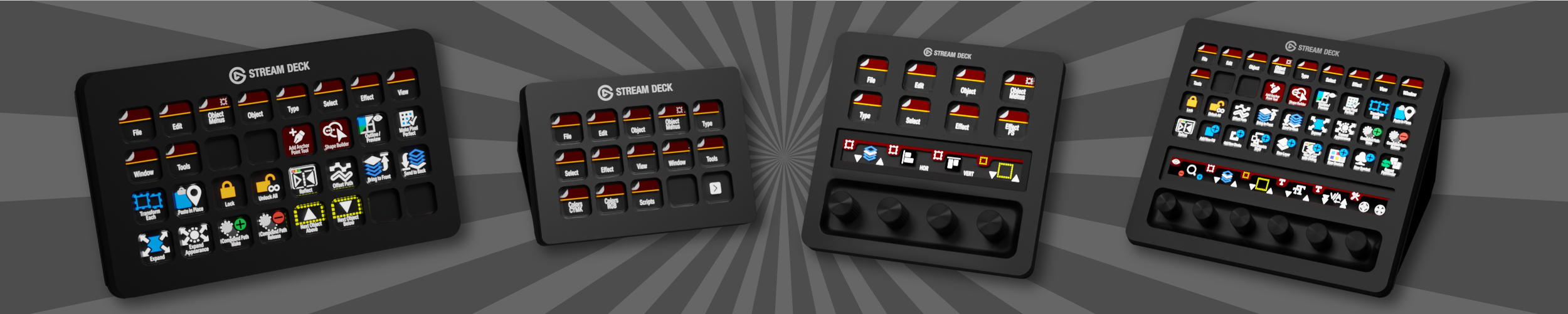
Each pack shows you exactly what's programmed — key counts by device (XL, Reg, Plus, XL+) and labelled/unlabelled icons included, so you know what you're getting before you buy.
XL
15-Key

Plus
XL+

Labelled
Unlabelled
Audio / Music Applications
Pro Tools 2026.4
Wavelab Pro 13
SpectraLayers Pro 13 NEW VERSION!
Izotope RX 12 Advanced
Logic Pro
Reaper

FL Studio
Apple GarageBand FREE
Audacity 4
Audio Hijack FREE

Transcribe FREE

forScore FREE
Creative Applications

Apple Motion

Camtasia
Affinity
Adobe Illustrator

Illustrator Plugins
Adobe After Effects
Apple iMovie FREE
DaVinci Resolve
Final Cut Pro
Pixelmator Pro
Figma
Sketch
Canva

CapCut

Handbrake FREE
Adobe Express FREE

VLC FREE
Apple Freeform FREE
Productivity Applications
Adobe InDesign

Keyboard Maestro
Apple Keynote
Apple Pages
Apple Numbers

Visual Studio Code

Mimestream Free

Apple Icons FREE

Neo Finder FREE
Handbrake FREE
Google Chrome FREE
Notion FREE
Slack FREE
VLC FREE

Obsidian FREE

Windows 11 FREE
Zoom FREE
Plugins

Mac Menu Trigger Plugin FREE

Mac Finder Tags Plugin FREE
Mac Window Snapper Plugin FREE
Mac Clipboard Manager Plugin FREE
Mac Script Runner Plugin FREE
Tap Tempo Plugin FREE
KM Runner (Keyboard Maestro) Plugin FREE

Stream Deck Icons & Profiles, Built for Clarity
Custom icon packs and ready-to-use profiles for your favorite audio, video, graphics, and productivity apps — designed to look sharp and function fast, right out of the box.
Designed for Clarity
Most icon packs lean on one or two colors per set. Ours use deliberate color and contrast variation so every icon's function is distinguishable at a glance — not just for visual polish, but because color alone isn't enough for everyone to tell icons apart. It's a design choice built for accessibility, not an afterthought.
One Purchase, Every Setup
Other Stream Deck packs sell Mac and Windows, or XL, Original, and Plus, as separate products — buy again if you switch platforms or upgrade your device. Ours don't work that way. Every purchase includes Mac and Windows, plus every device size we offer for that product, so you're covered whether you switch computers, add a second Stream Deck, or upgrade down the line.
Try Before You Commit
For most paid profile packs, we also offer a free Sampler — a smaller taste of the full icon set at no cost, so you can try the style and quality before buying the complete pack.
What's in Every Pack
Crystal-clear resolution optimized for Stream Deck displays
Labelled and unlabelled variants to match your setup
Consistent design language across every icon set
Categorized by app — audio, video, graphics, productivity, and more
Ready in Minutes
Drag-and-drop icon and profile installation
Instant download — icon sets and .streamDeckProfile files
Step-by-step setup guides with screenshots
Built by Someone Who Actually Uses These Apps
Every profile is hand-built by a working musician and developer, not templated. That means real keyboard shortcuts, real workflows, and regular updates as the software changes.